Chapter 5 Quick Start
For a brand-new company, the easiest trap is "what to build first, what next." This chapter gives a safe setup order, then walks a minimal business loop.
5.1 First Login & Change Personal Info
- Register a free owner account, or log in at https://dash.wholety.com. Registration creates a separate workspace. To join an existing company, ask its owner to create a subaccount for you.
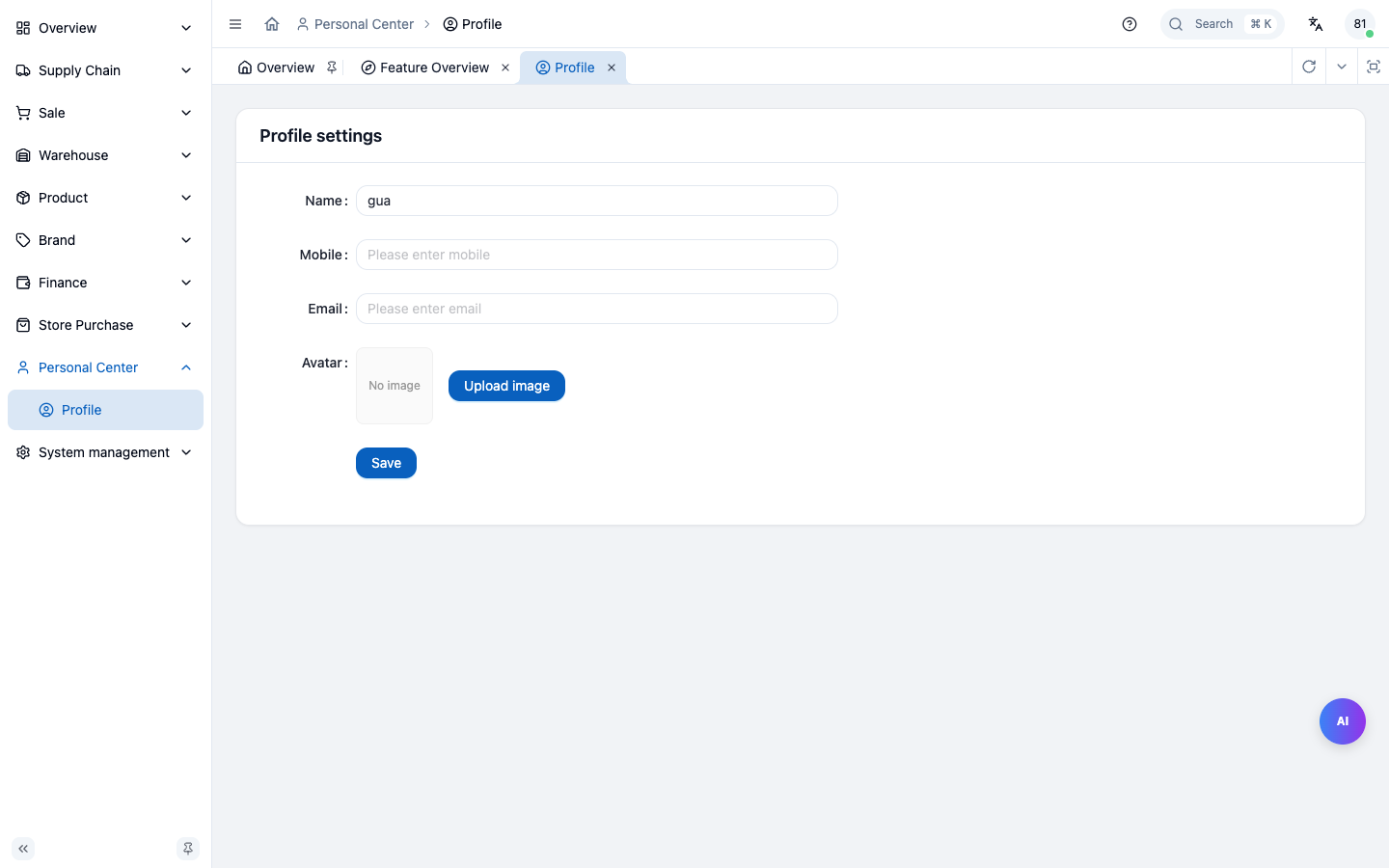
- After login, click the avatar top-right → Personal Center → Personal Info.
- Fill or verify your name and contact information. If your owner supplied a temporary password, change it here.
Free gives you 1 owner account, 0 subaccounts and 50 active products, with API Key and MCP access. Check your usage under System Admin → Account & Agents. See the Agent connection guide when you are ready to connect a client.
5.2 New-company Setup: Base Data Entry Order
This order must not be broken — later data depends on earlier. E.g. no warehouse → no stock-in; no SKU → no order.
| # | Data | Entry | Why first |
|---|---|---|---|
| 1 | Province & tax rate | System Admin → Region & tax | Taxing depends on tax zone; wrong → wrong tax everywhere |
| 2 | Finance type | Finance → Finance type | Payment method; required before settlement / invoice |
| 3 | Warehouse | Warehouse → Warehouse mgmt | Stock-in/out/stock all hang on a warehouse |
| 4 | Category / Brand / Brand category | Product / Brand | SKU must belong to a category & brand |
| 5 | Product & SKU (incl. volume) | Product → Product mgmt | The smallest unit of every order; fill volume accurately |
| 6 | Supplier + supplier category | Supply → Supplier mgmt | The counterparty of supply-chain orders |
| 7 | Merchant + merchant category | Sale → Merchant mgmt | The counterparty of sale orders |
| 8 | Members & roles | System Admin → Member mgmt | Give teammates accounts & permissions |
Rule of thumb: configure rules first (tax/finance) → build sites (warehouse) → list goods (category/brand/product) → connect people (supplier/merchant) → finally open accounts.
st=>start: 1. Tax zone / rate
f=>operation: 2. Finance type
w=>operation: 3. Warehouse
c=>operation: 4. Category / brand / brand category
p=>inputoutput: 5. Product / SKU (volume must be accurate)
s=>operation: 6. Supplier + category
m=>operation: 7. Merchant + category
e=>end: 8. Members & roles
st->f->w->c->p->s->m->e
5.3 Walk-through: A Minimal Business Loop
Use the simplest deal to connect all the concepts above. Follow it once and you'll understand how the system turns.
Prerequisite: completed 5.2 setup (a warehouse, an SKU, one supplier, one merchant).
Step 1 · Purchase order
- Supply → Supply-chain order → New; pick supplier, add SKU, set purchase price.
- Submit → state becomes "Pending approval".
Step 2 · Approval
- System Admin → Pending approval → approve this supply-chain order.
- Back to the order → confirm order → state "Ordered".
Step 3 · Stock-in on arrival
- Warehouse → In-Out → Purchase stock-in; pick this supply-chain order; enter qty, shelf, expiry.
- Stock-in done → supply-chain order state becomes "Stocked in".
- The SKU now has physical stock in the warehouse.
Step 4 · Sale order
- Sale → Sale order mgmt → New; pick merchant, add the same SKU, set sale/discount price.
- Submit → approve → confirm order → state "Ordered".
- At confirm, the SKU's sale-occupied (frozen) increases; available stock drops accordingly.
Step 5 · Stock-out & ship
- Warehouse → In-Out → Sale stock-out; pick this sale order; ship from the shelf.
- Stock-out done → sale order state "Stocked out"; physical stock drops, occupation released.
Step 6 · Supply settlement
- Supply → Supply settlement → pick this supply-chain order; register freight (allocated by volume); clear AP.
- State becomes "Settled".
Step 7 · Sale settlement
- Sale → Sale settlement → pick this sale order (its linked supply-chain order must be settled); register receipt.
- State becomes "Settled"; system computes profit, turnover, annualized return.
Loop complete. Open any dashboard and you'll see this deal's metrics summarized.
st=>start: 1. Purchase order
b=>condition: 2. Approved?
c=>inputoutput: 3. Stock-in (physical +)
d=>operation: 4. Sale order (freeze)
f=>inputoutput: 5. Stock-out (release)
g=>subroutine: 6. Supply settlement (AP + freight)
h=>subroutine: 7. Sale settlement (AR -> profit)
e=>end: Dashboard summary
st->b
b(yes)->c->d->f->g->h->e
b(no)->st
Chapter Summary
- First login: change password (personal center).
- Setup order: tax/finance type → warehouse → category/brand → product SKU → supplier → merchant → user role.
- Minimal loop: purchase → approve → stock-in → sale (freeze) → stock-out → supply settle → sale settle.
- Remember three key points: "freeze", "occupation", "settlement order" — every later chapter uses them.
Next: Product Management — how to list goods into the system.